
Xpress vs Enterprise Edition
Contents Hide
As of version 8.0.5 and later, BrightServer comes in two version, Enterprise edition which is the fully functional standard edition of BrightServer and the Xpress Edition. The Xpress edition is free to download and license, however limitations are enforced. The Xpress edition contains only a subset of features available and limits the number of devices that can connect to it.
Features not available in Xpress Edition
This is a complete list of restrictions placed on the Xpress Edition
Only relational databases and flat files are valid data sources in BEP projects
JavaScript is not available, meaning user defined data synchronisation, complex business logic and JavaScript based jobs cannot be implemented
Online queries from data sources are not supported meaning stored procedures and remote procedure calls cannot be utilised
BrightWeb is not available, along with branding and web user activity
BrightForms Reports are not supported
BEP projects that have parameterised values may not be deployed
User Activity logging and statistics are not available
Cannot run multiple apps on the same server instance. Only one active configuration is allowed
The internal system databases are not configurable
Free 30 day support is not provided
All these features are available in the Enterprise edition of BrightServer.
Licensing
Both BrightServer editions require a special license. Initially, without licenses BrightServer will operate in Demo mode until a valid license is uploaded and configured on the server.
Xpress Edition licenses can be requested and generated for free from www.brightxpress.com
To acquire Enterprise Edition licenses you will need to request for pricing information from https://www.brightxpress.com/request-pricing-information
BrightBuilder Xpress Edition Mode
By default, BrightBuilder will be installed in Xpress mode, which will limit the functionality of the interface to the features common to BrightServer Xpress edition instances. This means Reports will be unavailable in BSP and BEP projects and Scripts will be inaccessible in BEP projects.
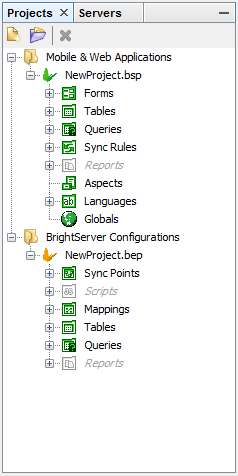
When accessing a standard BrightServer instance, you may change the operation mode of BrightBuilder to allow for all features enabled. You can do this by doing to Tools then Options and pressing the Operating Mode.
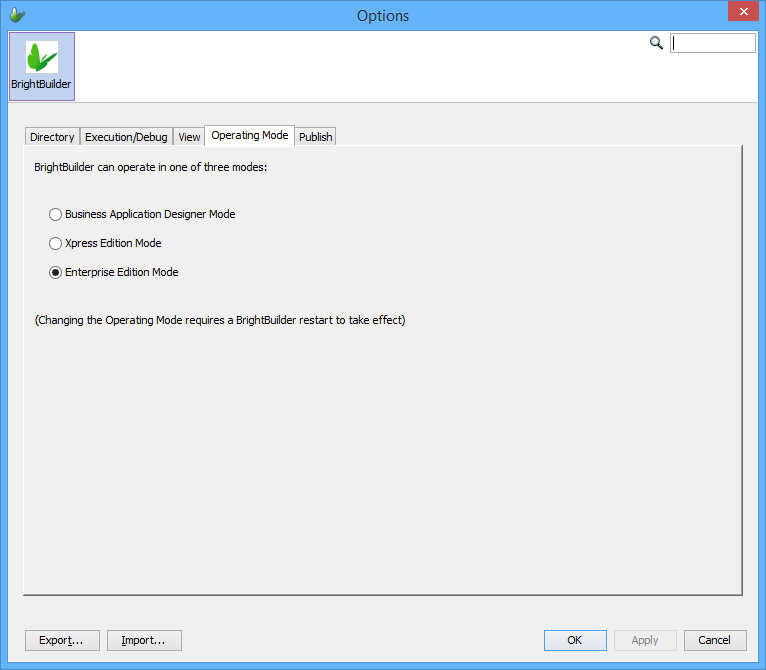
Uploading and running non-Xpress edition BSP and BEP projects (i.e. created from BrightBuilder in the ‘All features are enabled’ operating mode) on BrightServer Xpress Edition instances can cause unexpected behaviour. Please ensure projects are made in the correct operating mode depending on the BrightServer edition instance.