
The transform script is called when a connected sync point, providing the 'data' vector of RecordSets, is synchronised from. It will return a data set to the sync destination when completed.
This particular method will modify a single field in the first RecordSet, then return the modified set to the sync destination.
importClass (java.util.Calendar) ; // To create and manipulate Java Date values
importClass (java.util.Vector) ; // To create and manipulate Java Vector objects
importClass (java.lang.Double) ;
importClass (Packages.au.com.brightsoft.integrator.Record) ;
importClass (Packages.au.com.brightsoft.integrator.RecordSet) ;
importClass (Packages.au.com.brightsoft.integrator.FieldInfo) ;
importClass (Packages.au.com.brightsoft.integrator.Blob) ;
importClass (Packages.au.com.brightsoft.integrator.Util) ;
function transform(data)
{
// Write a message on the server.
ScriptSession.logInfo("Multiplying FIELD5 in TABLE4 by 1000 !") ;
// Iterate through the first RecordSet and process each Record.
rs = data.get(0) ;
for (i=0; i<rs.size(); i++)
{
record = rs.get(i) ;
// Transform record
record.set(4, new Double(record.get(4)*1000)) ;
}
// Return modified dataset.
return data ;
}
Note:
data is the input parameter for the method, which is a vector of RecordSet. The first set in this vector is manipulated, with the set returned. If a completely new set were to be specified, a new RecordSet("CLI_TABLE_9") call would be used.
This method is assuming that only a single table is sent to the server.
The transform script is called when a connected sync point, providing the 'data' vector of RecordSets, is synchronised from. It will return a data set to the sync destination when completed.
The following method will append additional records to the first RecordSet of the input vector, then return it as a result.
importClass (java.util.Calendar) ; // To create and manipulate Java Date values
importClass (java.util.Vector) ; // To create and manipulate Java Vector objects
importClass (java.lang.Double) ;
importClass (java.lang.Integer) ;
importClass (Packages.au.com.brightsoft.integrator.Record) ;
importClass (Packages.au.com.brightsoft.integrator.RecordSet) ;
importClass (Packages.au.com.brightsoft.integrator.FieldInfo) ;
importClass (Packages.au.com.brightsoft.integrator.Blob) ;
importClass (Packages.au.com.brightsoft.integrator.Util) ;
function transform(data)
{
rs = data.get(0) ;
var num_rec = 10;
var init_pos = rs.size();
ScriptSession.logInfo("Create new data") ;
for (i = init_pos; i < num_rec+init_pos; i++)
{
rand = Math.random() * 100;
bool = rand % 2;
str = "ADDITIONAL RECORD " + i;
date = Calendar.getInstance().getTime();
r = new Record();
r.add(new Integer(i));
r.add(new Integer(i));
r.add(new Integer(i));
r.add(str);
r.add(str);
r.add(rand);
r.add(rand);
r.add(bool);
r.add(bool);
r.add(date);
r.add(date);
r.add(null);
r.add(null);
rs.addRecord(r);
}
return data ;
}
Note:
data is the input parameter for transform() which is a vector of RecordSet.
This method is assuming that only a single table is sent to the server.
The code below describes how to iterate through data passed to a transform method, retrieving and processing the RecordSets for all tables involved in a parent/child - i.e. multiple table synchronisation. As transformations occur for the last table in the set at the end of the transaction, the sync panel would need to be laid out as follows, where each table in the set will need to invoke the same script, regardless if the connected table itself requires transformation.
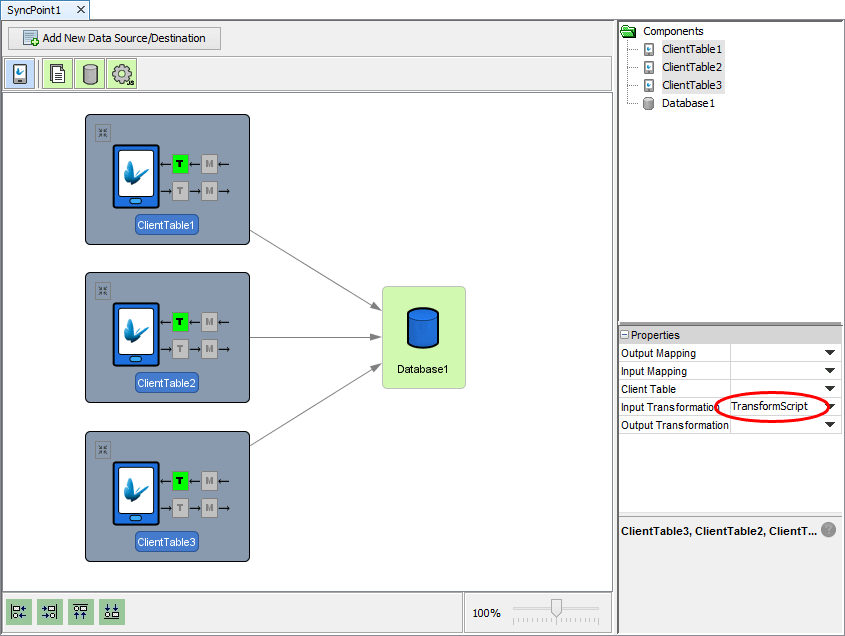
This will ensure that the transformation will always be guaranteed to be invoked, regardless if parent, child or single is sent to the server.
The actual implementation of the code must iterate through the RecordSets sent to the server, and perform any manipulations where necessary.
importClass (java.util.Calendar) ; // To create and manipulate Java Date values
importClass (java.util.Vector) ; // To create and manipulate Java Vector objects
importClass (java.lang.Double) ;
importClass (java.lang.Integer) ;
importClass (Packages.au.com.brightsoft.integrator.Record) ;
importClass (Packages.au.com.brightsoft.integrator.RecordSet) ;
importClass (Packages.au.com.brightsoft.integrator.FieldInfo) ;
importClass (Packages.au.com.brightsoft.integrator.Blob) ;
importClass (Packages.au.com.brightsoft.integrator.Util) ;
function transform(data)
{
ScriptSession.logInfo("Number of sets: !" + data.size());
for (j = 0; j < data.size(); j++)
{
rs = data.get(j);
if (rs.getName() == "CLI_TABLE_9")
{
ScriptSession.logInfo("Altering SATTR1 in CLI_TABLE_9!");
for (i=0; i<rs.size(); i++)
{
record = rs.get(i) ;
// TODO : Transform record
record.set(3, "Modified CLI_TABLE_9") ;
}
}
else if (rs.getName() == "CLI_TABLE_0")
{
ScriptSession.logInfo("Altering SATTR1 in CLI_TABLE_0!") ;
for (i=0; i<rs.size(); i++)
{
record = rs.get(i) ;
// TODO : Transform record
record.set(3, "Modified CLI_TABLE_0") ;
}
}
else if (rs.getName() == "CLI_TABLE_1")
{
ScriptSession.logInfo("Altering SATTR1 in CLI_TABLE_1!") ;
for (i=0; i<rs.size(); i++)
{
record = rs.get(i) ;
// TODO : Transform record
record.set(3, "Modified CLI_TABLE_1") ;
}
}
else
{
// No transformation necessary on other tables
ScriptSession.logInfo("Other Table !") ;
}
}
return data;
}
Note:
data is is the input parameter for transform() which is a vector of RecordSet, containing all tables possible for the transaction.
RecordSet.getName() is used to retrieve the name of the table sent to the server for comparison.