
BrightServer Xpress Edition
Contents Hide
BrightServer Xpress Edition is a specially tailored build of BrightServer which incorporates a subset of BrightServer Enterprise Edition functionality for developers, allowing an entry-level framework to develop and deploy mobile solutions using the BrightXpress Mobility Suite.
BrightServer Xpress Edition Overview
As of Version 8.0.5 and later, BrightServer comes in two versions - the fully functional standard edition (referred as the Enterprise Edition), and the BrightServer Xpress Edition, which is free to download and use.
BrightForms clients may synchronise to the BrightServer Xpress Edition instance and run without any restrictions for developers to create and deploy full end-to-end mobile solutions with back-end data synchronisation to and from relational databases and/or files.
Important to note that applications developed for BrightServer Xpress Edition may also be deployed and released on standard BrightServer instances in order to later take the powerful features of the highly scalable BrightServer product. This simply means solutions can be developed in the Xpress Edition and later easily migrated to the full Enterprise Edition.
BrightServer Features That Are Not Available In Xpress Edition
While BrightServer Xpress Edition provides a solid set of tools for developers to easily create and deploy end-to-end business solutions, the standard BrightServer contains even more powerful tools for developers to scale, integrate and automate their solutions with existing business processes.
The following are features which BrightServer extends on top of Xpress Edition features:
User defined data synchronisation by using JavaScript
JavaScript based scripting for custom synchronisation logic on the server side is a powerful tool in BrightServer which is not present in the Xpress edition. This means complex sync logic for reading and writing from multiple data sources and distributing the received field data back to business data systems is not available in the Xpress Edition.
User defined complex business logic written in JavaScript or Java
Stand-alone JavaScript based jobs running manually or on a schedule, web service functionality, and transformations prior to and after synchronisation from a data source, data push to remote field devices, email generation, creation of PDF files are not available in the Xpress Edition.
User defined JavaScript based jobs by using a powerful scheduler shipped with server
Job system and user defined jobs are not available in the Xpress Edition. Administrators cannot define jobs via the configuration panel, nor run them from the Job Status panel.
Data retrieval through online queries
Online queries are not available in the Xpress Edition. This means that stored procedures and remote procedure calls cannot be utilised.
Support for web browser based clients
BrightServer Enterprise Edition bundles BrightWeb. BrightWeb is the web engine that provides support for deploying BrightBuilder mobile projects as a web app through browsers. BrightWeb is not available in the Xpress Edition. BrightServer Enterprise Edition also bundles a web app that allows configuring and monitoring BrightServer instances. This is also not available in the Xpress Edition.
Detailed user activity logging and statistics
Detailed statistics of user BrightForms versions, application synchronised, and data retrieved/sent cannot be captured or viewed on the server in the Xpress Edition.
Multiple configurations may co-exist and run on the server
While multiple BEPs may be deployed to the Xpress Edition, but only one may be activated at a time. In having only one active configuration, staged roll-outs for back-end logic, nor multiple solutions cannot be configured in Xpress Edition; all users must be using the same BEP at any given time.
Parameterised BEP file values
BEPs which have parameterised values may not be deployed to the Xpress Edition servers. As such, BEPs must contain all values as-is, and, for instance, any change to database location would require a change to the BEP project, rather than having parameters separately.
Configurable internal system databases
The Xpress Edition will use the default internal database that ships with it for storing runtime and client data for the mobile solution. This may not be changed to use an external database such as Microsoft SQL Server.
BrightForms Reports are supported
Reports which arrange and organise data in printable report form may not be deployed to BrightServer in the Xpress Edition mode.
BrightServer Xpress Edition Licensing
BrightServer Xpress Edition requires a special license. Xpress Edition licenses can be requested and generated for free from www.brightxpress.com.
Initially, without licenses, BrightServer Xpress Edition will operate in Demo mode, until a valid license is uploaded and configured on the server.
For more information on retrieving and licensing either version of BrightServer, please refer to the Licensing BrightServer chapter of this document.
BrightBuilder Xpress Edition Mode
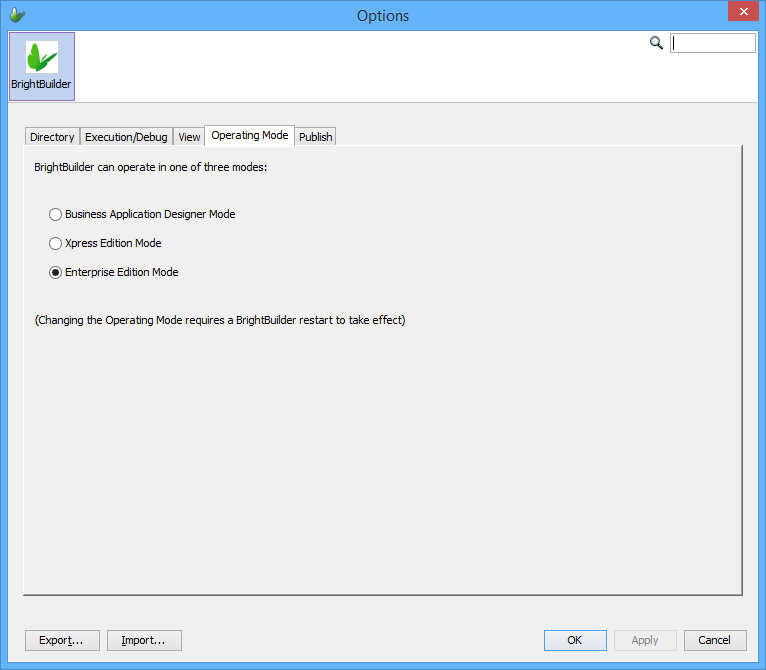
By default, BrightBuilder will be installed in Xpress mode, which will limit the functionality of the interface to the features common to BrightServer Xpress edition instances.
When accessing a standard BrightServer instance, the non-Xpress mode options may be enabled using the options panel of BrightBuilder - simply locate the 'Operating Mode' tab, and select 'All features are enabled'. This may be done at any time. After setting and saving this option, proceed to restart BrightBuilder for the change to take effect.
 Warning:
Uploading and running non-Xpress Edition BSP and BEPs created
in the 'All features are enabled' mode may cause unexpected behaviour
if deployed to BrightServer Xpress Edition instances. Please ensure
that projects requiring to be run in BrightServer Xpress Edition
are created and edited while BrightBuilder is in Xpress Edition
mode before deployment.
Warning:
Uploading and running non-Xpress Edition BSP and BEPs created
in the 'All features are enabled' mode may cause unexpected behaviour
if deployed to BrightServer Xpress Edition instances. Please ensure
that projects requiring to be run in BrightServer Xpress Edition
are created and edited while BrightBuilder is in Xpress Edition
mode before deployment.