
BrightServer's Internal Database
Contents Hide
BrightServer uses the open source relational database 'Derby' for its internal server databases. BrightServer is initially configured such that its system and runtime databases are 'internal', utilising the 'Derby' databases. This includes the client images when devices synchronise to BrightServer.
These databases are created on BrightServer startup if they do not already exist.
To assist accessing the data in this database, included with the BrightServer installation are a couple of batch files - dbutil.bat and dbutil_system.bat. These files are located in the BrightServer instance's utils directory.
Double clicking dbutil.bat or running through the command line interface will run the Derby ij tool and connect to the brightdb database file.
Similarly, the dbutil_system.bat file may be used to access runtime values.
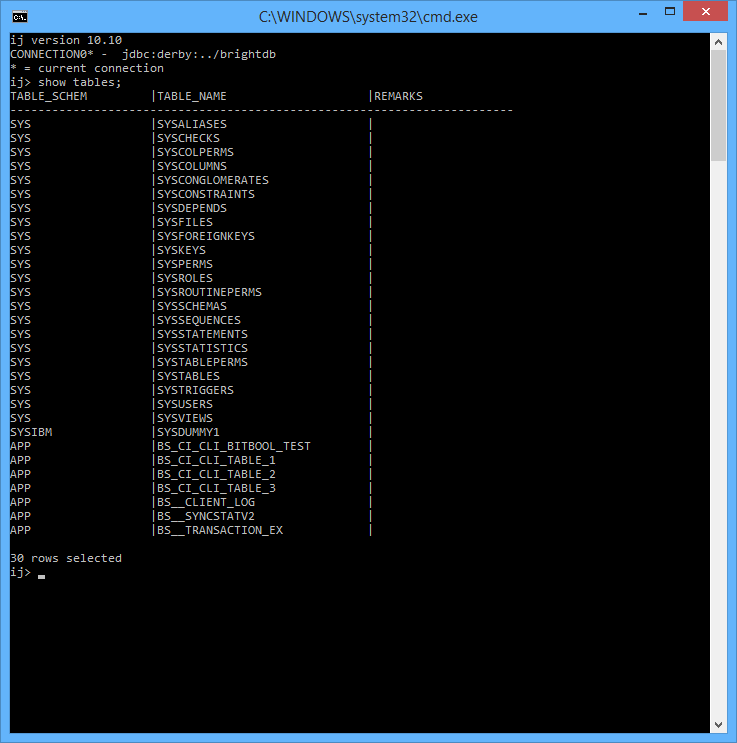
Using this command line input, the internal relational databases may be viewed and accessed via commands such as
show tables;
For a full listing of commands, the help; command may be inputted.
SQL statements may also be run through this command prompt.