
BrightServer Logging
Contents Hide
BrightServer Logging
BrightServer will log its activities via console output when it is running. This output consists of the time the record was written, a tracing level and a description of the event which occurred. In addition to console output, these lines are also written to file via the 'logs' folder of its configured directory.
Information displayed in the console and logged by BrightServer is determined by the level of which the logging takes place. Tracing levels in ascending order of verbosity are: FATAL, ERROR, WARN, INFO, DEBUG.
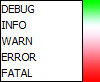
| Trace Levels | Description |
| Fatal | Errors which stops the server. |
| Error | Application failures (recoverable). |
| Warn | Warnings (e.g. low resources etc.). Application can continue to function. |
| Info | Detailed application operations - for example, users logging in, and data synchronised to/from the server. |
| Debug | All operations (e.g. exceptions, methods calls, function parameter values, return values, etc.). |
By default, BrightServer will display and log WARN messages or higher to file.
These files which written by BrightServer may thus be used to examine server activity, and diagnose any synchronisation issues on the server. On top of client device synchronisation, Jobs/Scripts may write to the console/log via the ScriptSession object, while the Trace.Debug(), Trace.Info() and Trace.Error() methods may also be used to write to the server log in BrightWeb.
The information logged may also be viewed in real-time via the Remote Tracing panel in BrightBuilder. The level of logging may also be changed via this panel.
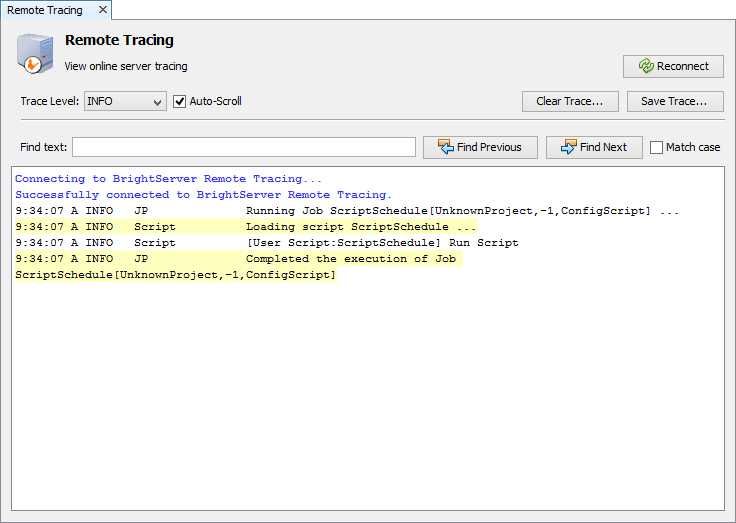
How BrightServer logs files is determined by the log4j.xml file in the conf directory. For more information regarding this file, please refer to the log4j section below.
 If
run as a service, the 'console' logging file output will be instead
be managed as defined by the service's wrapper.conf file, with
the log4j file's console file settings ignored.
If
run as a service, the 'console' logging file output will be instead
be managed as defined by the service's wrapper.conf file, with
the log4j file's console file settings ignored.
The Log4j File
The log4j file is a configuration file which loads when the BrightServer executable is started, and is located in the 'conf' directory of BrightServer. Editing this file, you may specify what level of error is to be displayed or logged by the server.
There are two streams which the server may write to; either to console or file, and each has it's own threshold level defined. There is also a root logger which specifies the minimum level of logging for both of these streams. Please note that because of this, if the root logger were to be set up with the parameters below:
<!-- ======================= -->
<!-- Setup the Root logger -->
<!-- ======================= -->
<root>
<priority value ="WARN" />
<appender-ref ref="CONSOLE"/>
<appender-ref ref="INTEGRATOR_LOG"/>
</root>
The file and console loggers will not log INFO and DEBUG level messages. If these levels need to be logged, the 'priority value' attribute needs to be changed to the respective level in the root logger.
For
more information on the Apache log4j library for managing
log behaviour and settings, please refer to http://logging.apache.org/log4j/
Configuring Log Notification via Email
The BrightServer logging configuration file "log4j.xml" configures how BrightServer logs debug, info, warning, error and fatal lines. By default, it is set to log any info lines to both file and console. It is located in the "conf" directory of BrightServer (i.e. .\conf\log4j.xml). The configuration format consists of a series of 'appenders' for each stream of notification, such as:
<!-- ============================== -->
<!-- Append messages to the console -->
<!-- ============================== -->
<appender name="CONSOLE" class="org.apache.log4j.ConsoleAppender">
<param name="Threshold" value="INFO"/>
<param name="Target" value="System.out"/>
<!-- Unicode text logging -->
<param name="encoding" value="UTF-8"/>
<layout class="org.apache.log4j.PatternLayout">
<param name="ConversionPattern" value="%d{HH:mm:ss} %-5p %m %n"/>
</layout>
</appender>
These configurations may be extended to include an email stream with email addresses, such that certain levels of logging may automatically be forwarded to relevant parties, such as system administrators. To do this, after the previous lines of code, insert the following:
<!-- ==============================
-->
<!-- Append messages to a sys admin -->
<!-- ============================== -->
<appender name="EMAIL"
class="org.apache.log4j.net.SMTPAppender">
<param name="BufferSize" value="512"
/>
<param name="SMTPHost" value="<SMTP
Email Server Address>" />
<param name="From" value="<'From'
Email Address>" />
<param name="To" value="<'To'
Email Address (eg. Admin)>" />
<param name="Subject" value="An error occured on BrightServer
192.168.1.5:8080" />
<layout class="org.apache.log4j.PatternLayout">
<param name="ConversionPattern"
value="%d{HH:mm:ss} %-5p %m %n" />
</layout>
<filter class="org.apache.log4j.varia.LevelRangeFilter">
<param name="LevelMin"
value="ERROR"
/>
<param name="LevelMax"
value="FATAL"
/>
</filter>
</appender>
Notice, the parts highlighted in yellow are to be modified to the required values for the email to be sent. The 'filter class' may also be specified to a range, based on the desired level of output to be sent to the email address(es).
In the above scenario, the levels Error to Fatal will be sent to the defined email addresses.
The lines of the log will be concatenated until an error or above is reached, then the lines are sent to the recorded emails.
The 'from' email address must also be a valid email address on the SMTP server. Multiple emails may be specified with the ',' character, for example:
<param name="To" value="example1@example.com,example2@example.com" />
Once the above line has been registered in the log4j file, it must be registered under the root logging node as follows:
<root>
<priority value ="INFO" />
<appender-ref ref="CONSOLE"/>
<appender-ref ref="SERVER_LOG"/>
<appender-ref
ref="EMAIL"/>
</root>
After changing the configuration file, the changes will take effect once BrightServer restarts.