BrightForms Gestures
Contents Hide
BrightForms on iOS, Android and Windows Phone/Store App have the ability to process user gestures performed on the device.
A form which is opened in BrightForms may be configured to listen for, detect and perform operations based on these gestures by the user, with the intensity and detection of the gesture is based on the Android and iOS system standards. This feature allows developers to provide a cohesive user experience with the operating system through BrightForms, while also providing intuitive and efficient options for the end user within BrightForms applications.
 Please note, only the 'top most' form, ie, the one visible to the
user may process gestures. Any form which is not visible will not
detect any user gestures performed on the device. Furthermore, gestures
will not be detected via system dialogs, such as the Synchronisation
panel, Settings dialog or message boxes.
Please note, only the 'top most' form, ie, the one visible to the
user may process gestures. Any form which is not visible will not
detect any user gestures performed on the device. Furthermore, gestures
will not be detected via system dialogs, such as the Synchronisation
panel, Settings dialog or message boxes.
Configuring BrightForms Gestures
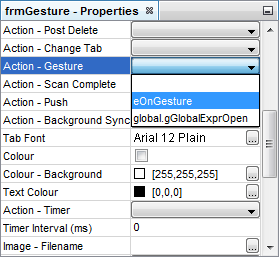
A form will process gestures based on its 'Action - Gesture' property configured in BrightBuilder. For each time a gesture is detected, it will trigger the expression defined by this property to run for the form.
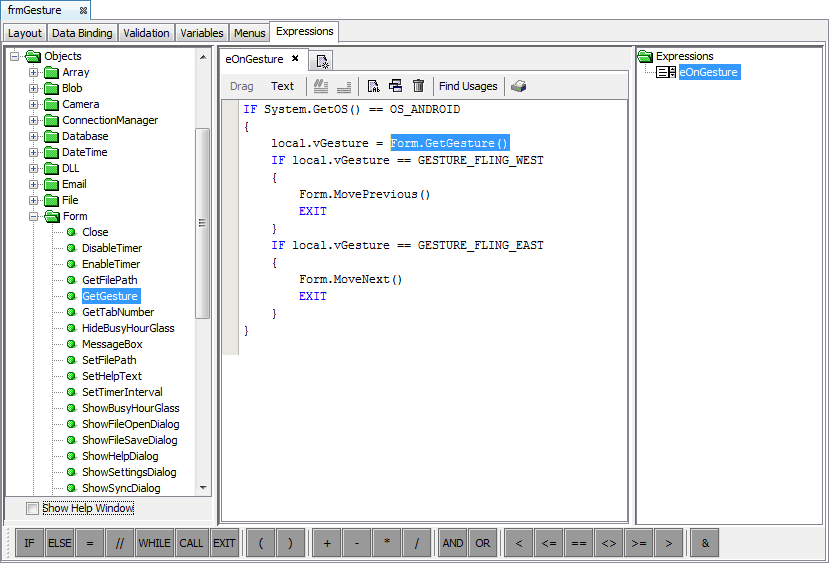
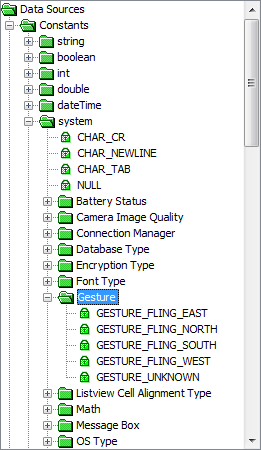
Within the expression set, the specific gesture inputted by the user may be retrieved by using the Form.GetGesture() method against the valid the gesture types listed under the Constants > Systems > Gesture node of the Data source tree. Once the gesture is identified, specific application behaviour associated to it may be defined in the expression, such as moving to the next or previous record when the east/west fling gestures are detected.