
The BrightXpress Mobiltiy Suite, in addition to providing a range of JDBC drivers and libraries out of the box, also supports the ability to specify custom JDBC drivers and connection strings for BrightServer data sources. This allows BrightServer or BrightBuilder to connect to non-default Database Types, such as Pervasive SQL databases.
These custom drivers may be defined using the 'Custom' Database Type in the Database panels of BrightBuilder.
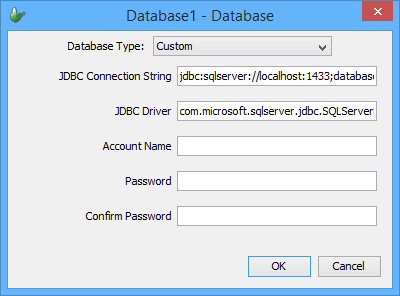
Using this Database type in the Database dialog, custom connection strings for additional JDBC drivers may be used. In order to load the JDBC drivers themselves, their JAR or ZIP file must also be placed in BrightServer and/or BrightBuilder's installation directory, listed below.
The custom driver must be present for BrightServer when a custom database is defined in a BEP and is used for synchronisation. In order for the custom driver to be detected, it must be placed in the following BrightServer directory:
[BrightServer Install Dir]\lib\
If the library cannot be found, synchronisation will fail, with an error on the server.
Database querying functionality in BrightBuilder such as Importing and Creating Database tables, as well as the Query Analyser tool require the custom JDBC drivers to be present in the following directory:
[BrightBuilder Install Dir]\jre1.8.0\lib\ext\
An error messagebox will appear if the server is connected to via BrightBuilder without these libraries present.