
BrightServer Log Notification via Email
Contents Hide
The BrightServer logging configuration file "log4j.xml" configures how BrightServer logs debug, info, warning, error and fatal lines. By default, it is set to log any info lines to both file and console. It is located in the "conf" directory of BrightServer (i.e. .\conf\log4j.xml). The configuration format consists of a series of 'appenders' for each stream of notification, such as:
<!-- ============================== -->
<!-- Append messages to the console -->
<!-- ============================== -->
<appender name="CONSOLE" class="org.apache.log4j.ConsoleAppender">
<param name="Threshold" value="INFO"/>
<param name="Target" value="System.out"/>
<!-- Unicode text logging -->
<param name="encoding" value="UTF-8"/>
<layout class="org.apache.log4j.PatternLayout">
<param name="ConversionPattern" value="%d{HH:mm:ss} %-5p %m %n"/>
</layout>
</appender>
These configurations may be extended to include an email stream with email addresses, such that certain levels of logging may automatically be forwarded to relevant parties, such as system administrators. To do this, after the previous lines of code, insert the following:
<!-- ==============================
-->
<!-- Append messages to a sys admin -->
<!-- ============================== -->
<appender name="EMAIL"
class="org.apache.log4j.net.SMTPAppender">
<param name="BufferSize" value="512"
/>
<param name="SMTPHost" value="<SMTP
Email Server Address>" />
<param name="From" value="<'From'
Email Address>" />
<param name="To" value="<'To'
Email Address (eg. Admin)>" />
<param name="Subject" value="An error occured on BrightServer
192.168.1.5:8080" />
<layout class="org.apache.log4j.PatternLayout">
<param name="ConversionPattern"
value="%d{HH:mm:ss} %-5p %m %n" />
</layout>
<filter class="org.apache.log4j.varia.LevelRangeFilter">
<param name="LevelMin"
value="ERROR"
/>
<param name="LevelMax"
value="FATAL"
/>
</filter>
</appender>
Notice, the parts highlighted in yellow are to be modified to the required values for the email to be sent. The 'filter class' may also be specified to a range, based on the desired level of output to be sent to the email address(es).
In the above scenario, the levels Error to Fatal will be sent to the defined email addresses.
For reference, the levels of errors (from lowest to highest) are:
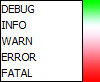
The lines of the log will be concatenated until an error or above is reached, then the lines are sent to the recorded emails.
The 'from' email address must also be a valid email address on the SMTP server. Multiple emails may be specified with the ',' character, for example:
<param name="To" value="example1@example.com,example2@example.com" />
Once the above line has been registered in the log4j file, it must be registered under the root logging node as follows:
<root>
<priority value ="INFO" />
<appender-ref ref="CONSOLE"/>
<appender-ref ref="SERVER_LOG"/>
<appender-ref
ref="EMAIL"/>
</root>
After changing the configuration file, the changes will take effect once BrightServer restarts.
 BrightServer
uses the Apache log4j library for managing log behaviour and settings.
For more information, please refer to http://logging.apache.org/log4j/
BrightServer
uses the Apache log4j library for managing log behaviour and settings.
For more information, please refer to http://logging.apache.org/log4j/